
Introduction
To get a better perception of HTML Injection, firstly we should know what HTML is:
HTML is a markup language, where all the website’s elements are written in the tags. It is mostly being used for creating websites. Web pages are being sent to the browser in the form of HTML documents. Then those HTML documents are being converted into normal websites and displayed for the final users.
And about the HTML injection:
HTML injection is a type of injection issue that occurs when a user is able to control an input point and is able to inject arbitrary HTML code into a vulnerable web page. This vulnerability can have many consequences, like disclosure of a user’s session cookies that could be used to impersonate the victim, or, more generally, it can allow the attacker to modify the page content seen by the victims.
We can see many tutorials of ‘HTML injection’ technique on the Internet, but it is hard for newbies to understand. I will introduce two specific examples to see how to use ‘HTML injection’ technique to test security. We will try to test with the disabled fields and hidden fields as below:
Disabled fields
In some websites, some elements on the page are disabled because of some behind logics such as authorizations, validation of these fields… So, the question is how can we change the HTML to make them enabled? Then we can input data, perform actions… on these disabled fields.
To do that, we need to open the Development tool of the browser then navigate to the Console tab and input this magic code:
$("[disabled]").removeAttr("disabled").css({'color':'red'})
It will find all disabled fields and remove the disabled attribute then change the color to red, so we can easily know what fields were disabled before.
Now, it is your job to use these fields for testing security or data validation. It depends on your website’s logic.
For example:
When registering an account for a site, it requires you to input a phone number. If you do not input the phone number, the ‘Register’ button is always disabled.

Then, use the magic code above to enable the ‘Register’ button.
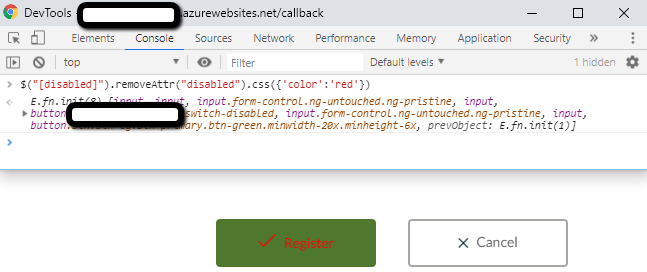
Finally, click the button and see how your website reacts: Will it allow the user to create a new user without a phone number OR will it show the error message that requires the phone number?
Hidden fields
In the website, some fields or buttons are hidden based on the requirement of the customer. E.g.: If you do not input all required fields, the ‘Save’ button will be hidden. So, how can we save data even though required fields are not entered? Let’s see how we can test in this situation:
-
We need to know where the hidden field/button is…
-
Inspect this place to see the field’s property. Then, we will see the ‘invisible’ property.
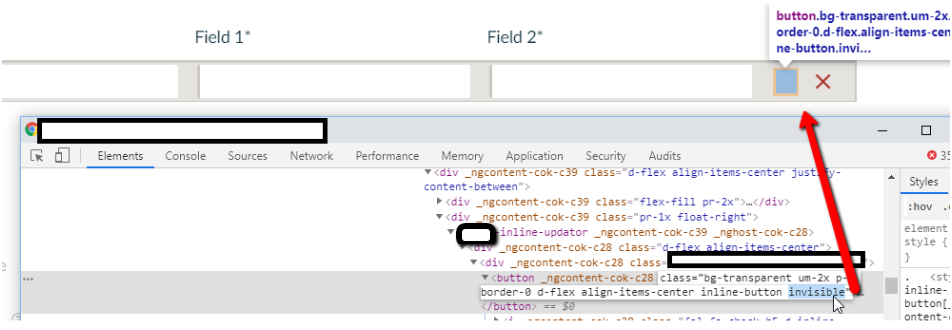
-
Remove the ‘invisible’ property and then the hidden field/button will be shown
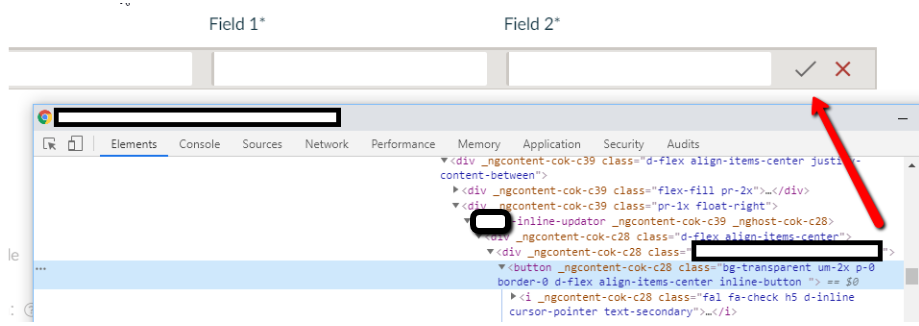
-
Finally, we can see the hidden field/button, just use it as usual and see how your website reacts: Will it allow the user to save data without entering required fields?
Moreover, when testing the website, you will use many users with different roles on the website to test, such as: Admin, write, read-only… You will notice that the page is different for different logged-in users. All fields are shown with admin user but hidden with read-only user. Use this technique to see if the user with read-only/write access can perform some actions that are only available for the user with Admin access.
Summary
Here are some ways that we can use the HTML injection technique to test security or data validation. However, it’s limited to testing in the front-end only. If you want to test the security on the Server side, please see my first post about using Fiddler https://ritvn.com/how-to-use-fiddler-to-inspect-and-modify-request-response/
References
https://www.owasp.org/index.php/Testing_for_HTML_Injection_(OTG-CLIENT-003)